Build a Token based RESTful APIs with Fastify, Prisma & TypeScript — Part 1
Step-by-step guide to create token-based RESTful APIs with Fastify, Prisma, JWT, and TypeScript for secure authentication.
Published on
16 min read
Hi there 👋,
Are you wondering to building an scalable web application? You’ll probably need user authentication. It is our responsibility as developers to protect user data and make sure that only people with permission can access resources that are protected.
Building scalable and maintainable APIs has become a fundamental skill. RESTful APIs serve as the backbone of modern web applications, enabling seamless communication between client-side applications and back-end services. If you’re new to API development or looking to expand your toolkit, this guide is for you 🫵
In this step-by-step article, I’ll guide you through building a robust token based RESTful API from scratch using a powerful tech stack: Fastify, JWT, TypeScript, Node.js, and Prisma. Fastify, known for its speed and low overhead, is an ideal choice for creating high-performance APIs. TypeScript enhances code quality with static typing, while Prisma simplifies database interactions. PostgreSQL, a leading open-source relational database, will serve as the backbone for data storage and retrieval.
To ensure your API is well-documented and easy to test, On the next part, I’ll also cover integrating Swagger for automated API documentation and using Postman for testing API endpoints. By the end of this article, you’ll not only understand the fundamental concepts behind token based authentication and RESTful APIs but also have a practical implementation that you can integrate into your projects.
However, I divided this article into two partsPart 1: Set up the
project & Implementation of token based authentication. Part 2:
Implementing the product routes & Documentation. (Swagger)
Whether you’re a seasoned developer or just starting, this article will equip you with the knowledge and tools to create APIs that can scale with your projects and stand the test of time. Let’s dive in and start building!
Install TypeScript globally.
You can use this command to install TypeScript globally, this means that you can use the tsc command anywhere in your terminal
Initiate the prisma
NOTE: When you run this code,Prismafolder and.envfile will be automatically created within your project
npx prisma init --datasource-provider postgresql
Create a new database on neon.tech and copy the DATABASE_URL and paste it into the .env file
Create the prisma schema models
prisma/schema.prisma
generator client { provider = "prisma-client-js"}datasource db { provider = "postgresql" url = env("DATABASE_URL")}model User { id Int @id @default(autoincrement()) email String @unique name String? password String salt String products Product[]}model Product { id Int @id @default(autoincrement()) title String @db.VarChar(255) content String? price Float ownerId Int owner User @relation(fields: [ownerId], references: [id], onDelete: Cascade) createdAt DateTime @default(now()) updatedAt DateTime @updatedAt @@index([ownerId])}
Migrate the schema models. (will be created the migrations folder inside the prisma
npx prisma migrate dev --name init
Create the utils/prisma.ts file to make the prisma connection
src/utils/prisma.ts
import { PrismaClient } from "@prisma/client";declare global { var prisma: PrismaClient | undefined;}export const db = globalThis.prisma || new PrismaClient();if (process.env.NODE_ENV !== "production") globalThis.prisma = db;
Here, I am using a proper method which can be used in production environment as well. It will avoid some hydration errors.🤗
Implement the user schema with zod
src/modules/user/user.schema.ts
import * as z from "zod";const createUserSchema = z.object({ email: z .string({ required_error: "Email is required", invalid_type_error: "Email is not valid", }) .email(), name: z.string(), password: z.string({ required_error: "Password is required", }),});export type CreateUserInput = z.infer<typeof createUserSchema>;
Implement the user service for createUser function and import the CreateUserInput type
src/modules/user/user.service.ts
import { db } from "../../utils/prisma";import { CreateUserInput } from "./user.schema";export async function createUser(input: CreateUserInput) { const user = await db.user.create({ data: input, // here error might come, it will be fixed. });}
Let’s take a look at what is happening above:hashPassword : Generate the salt, and using it hash the password.
verifyPassword : Taking the inputted password, salt, and hash then compare them to check the validity of the password.
import * as z from "zod";import { buildJsonSchemas } from "fastify-zod";const userCore = { // define the common user schema email: z .string({ required_error: "Email is required", invalid_type_error: "Email is not valid", }) .email(), name: z.string(),};const createUserSchema = z.object({ ...userCore, // re-use the userCore object password: z.string({ required_error: "Password is required", }),});const createUserResponseSchema = z.object({ id: z.number(), ...userCore,});export type CreateUserInput = z.infer<typeof createUserSchema>;export const { schemas: userSchemas, $ref } = buildJsonSchemas({ createUserSchema, createUserResponseSchema,});
In here, We need to attach this createUserResponseSchema to our route
(_‘/’_) to say only respond with these properties. And the way that
we’re going to do that is with a fastify plugin called fastify-zod
Inside our main function we wanna register this schema:
src/app.ts
// ...import { userSchemas } from "./modules/user/user.schema";async function main() { for (const schema of userSchemas) { // should be add these schemas before you register your routes server.addSchema(schema); } server.register(userRoutes, { prefix: "api/users" }); // routes register // try-catch block}main();
Register the @fastify/jwt and pass the secret from .env - Then we created a hook and passed the app.jwt to its request object. In Fastify, a prehandler hook is a powerful and flexible feature that allows you to execute logic before a route handler is called. It provides a way to perform tasks such as authentication, validation, data transformation, or any other processing that should occur prior to the actual route handler being invoked.
Finally, we register our @fastify/cookie . The hook option allows you to determine at which stage of request processing the plugin should handle cookies.
I am sure your typescript is screaming at you 🤬, What is req.jwt
So to fix this, we need to let fastify know, what this is. Create a global.d.ts file on root. and include it on tsconfig.json
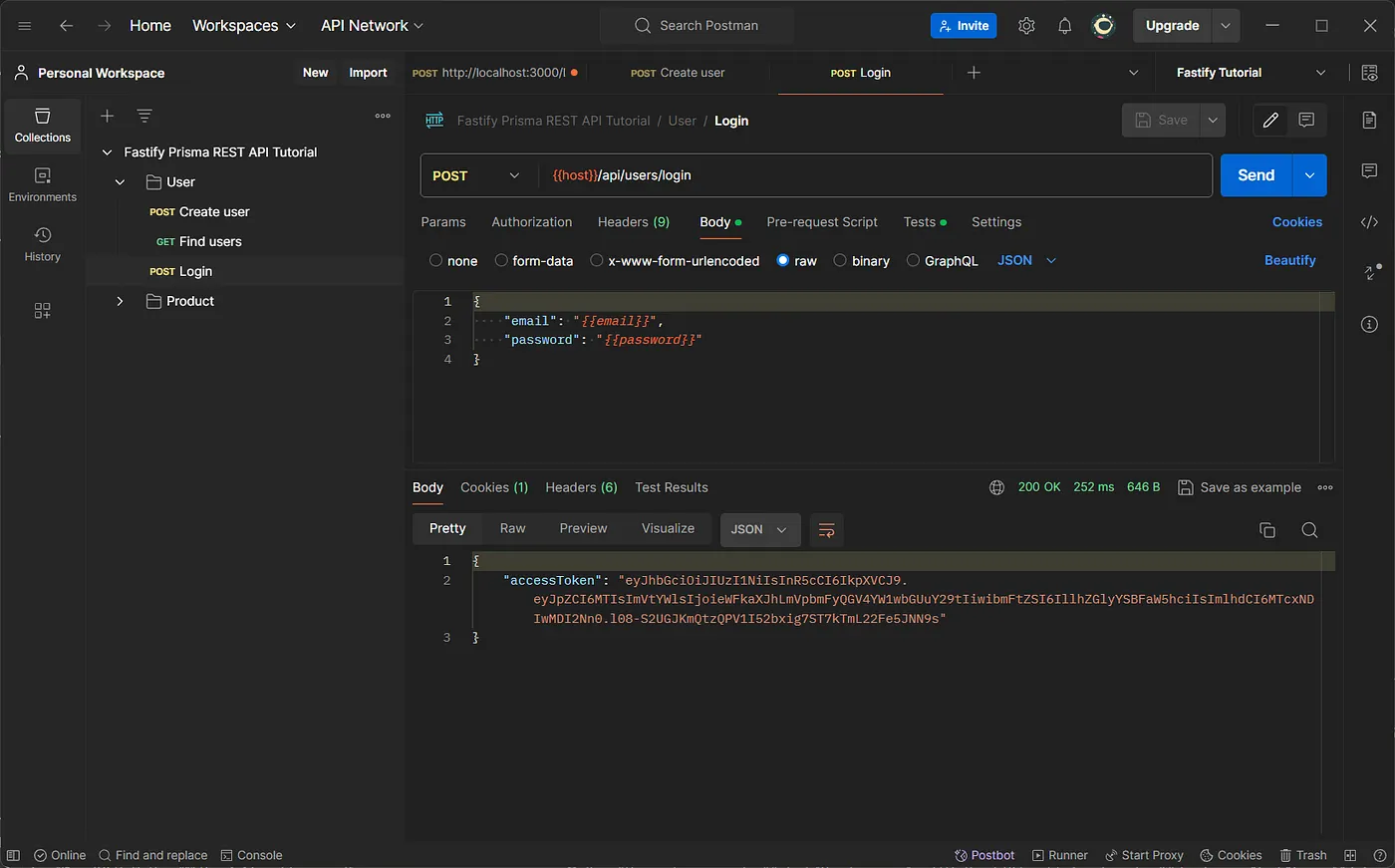
It’s time to check, if it works or not. We use the email and password that we created earlier to login.
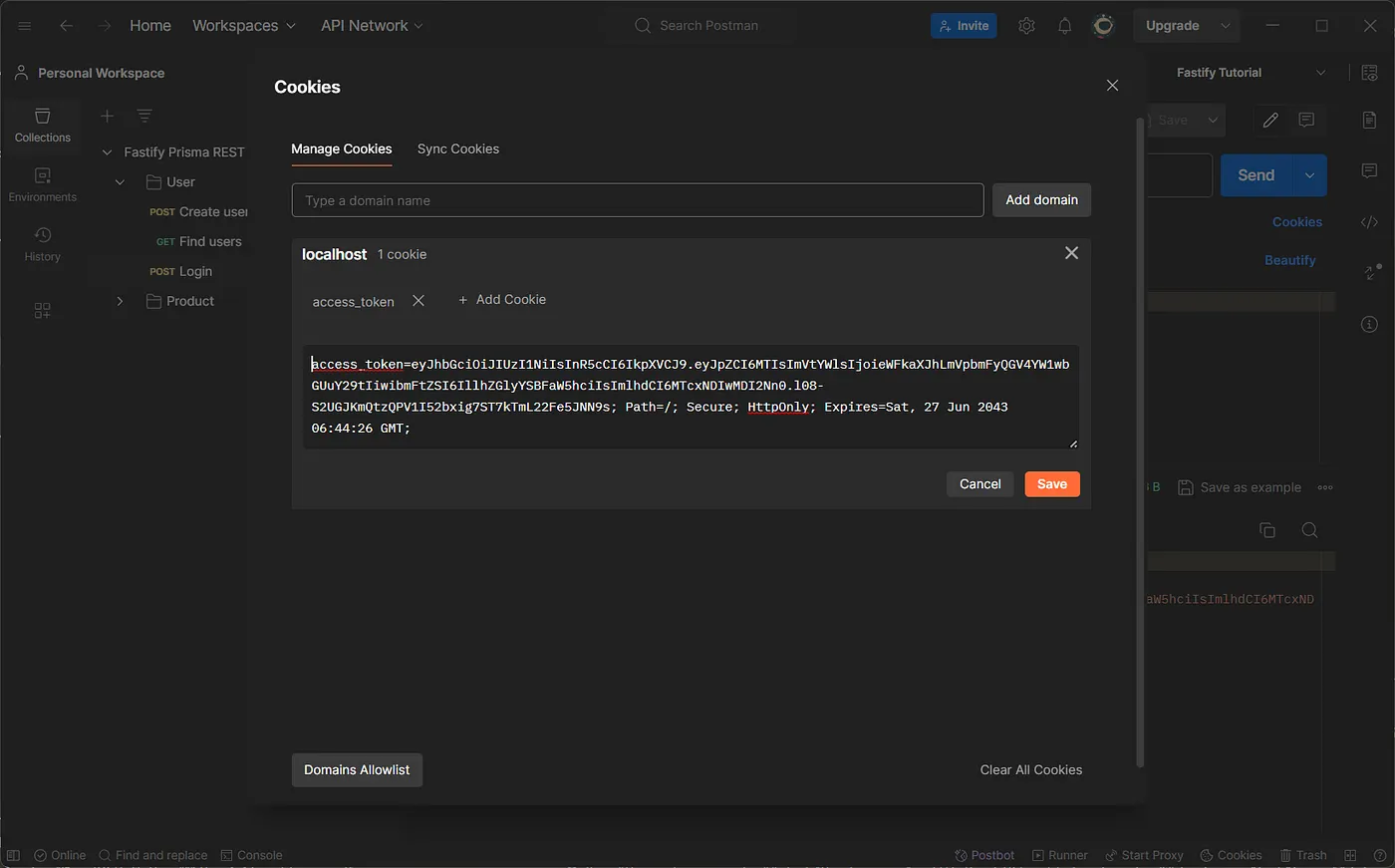
Finally, It returns the token and also sets it to cookies. 👏
We did the authentication part, now we can successfully register and login as a user. Now we are going to look at the most important application of what we have just done. Let’s come with me 🚶♂️
Note: We don’t need to protect all routes. There could be resources that
can be accessible to all. So we will manually protect some routes that only
authorized users can access.
For that, we can manually check if the request header has cookies and verify its token every time.
But here is an alternative way, we can user fastify decorate for this.
decorate is a method that allows you to extend the functionality of Fastify’s code objects, such as: Fastify Instance (fastify), the request parameter (request), and the reply onject (reply). It’s a powerful feature that enables you to add custom properties, methods, or utilities to these objects, making them available throughout your Fastify application.
Create get users route and protect it with authenticate preHandler.
src/modules/user/user.route.ts
// user.route.tsimport { getUsersHandler, loginHandler, registerUserHandler,} from "./user.controller";async function userRoutes(fastify: FastifyInstance) { // other codes fastify.get( "/", { preHandler: [fastify.authenticate], }, getUsersHandler, );}
Create getUsersHandler controller and getUsers service function.
src/modules/user/user.controller.ts
// user.controller.ts// other handler functionsexport async function getUsersHandler() { const users = await getUsers(); return users;}
src/modules/user/user.service.ts
// user.service.ts// other functionsexport async function getUsers() { return db.user.findMany({ select: { id: true, name: true, email: true, }, });}
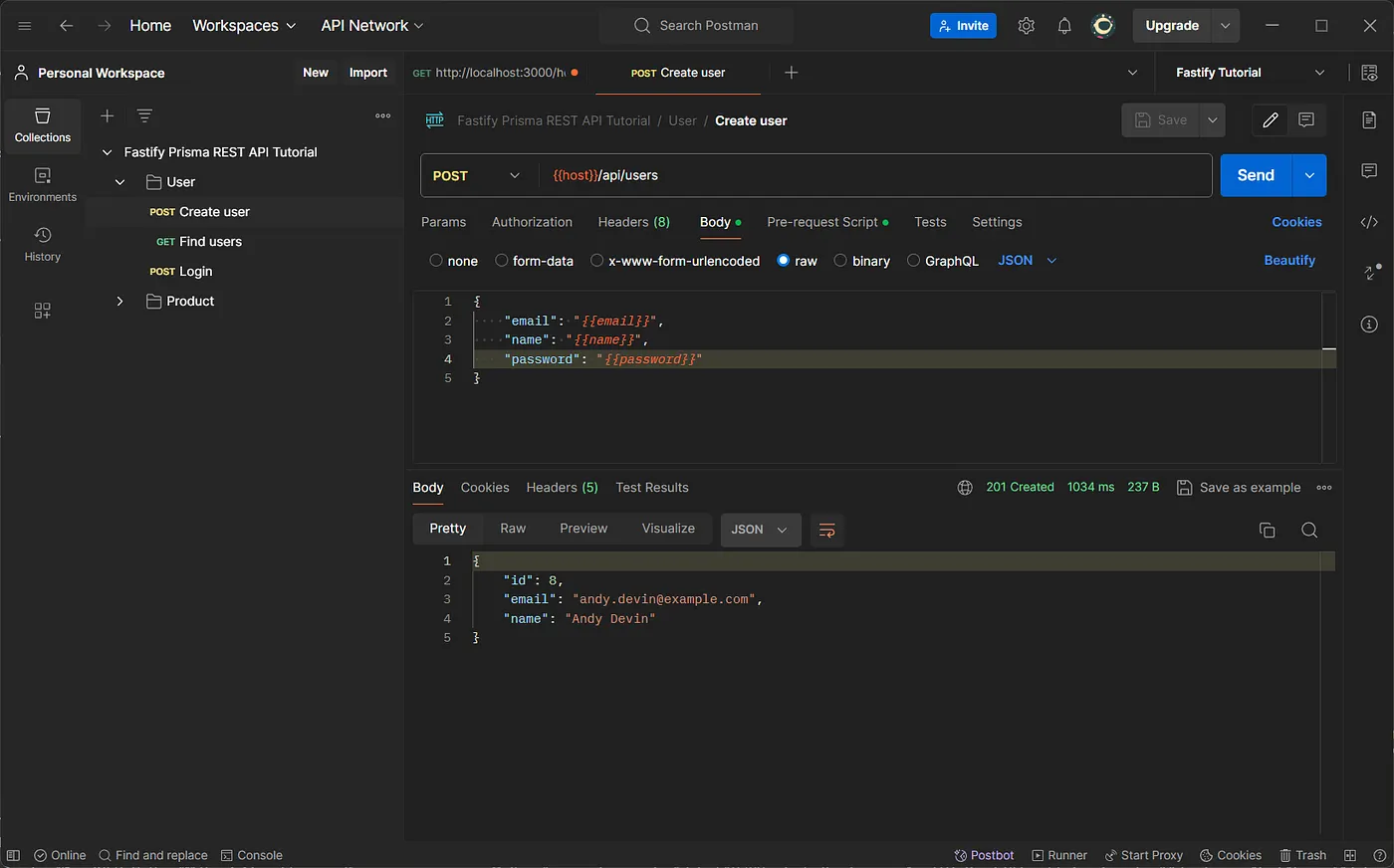
It’s time to check whether we were successful in protecting our route or not. You can try with your Postman to get users with login and without login. (you can also check the response when you change or remove the authorizations token).
It’s very easy method, we just need to clear the cookies. That’s it 🤷
Create logout route and use the preHandler
src/modules/user/user.route.ts
// user.route.tsimport { logoutHandler, getUsersHandler, loginHandler, registerUserHandler,} from "./user.controller";async function userRoutes(fastify: FastifyInstance) { // other codes fastify.delete( "/logout", { preHandler: [fastify.authenticate], }, logoutHandler, );}
Create logoutHandler controller function
src/modules/user/user.controller.ts
// user.controller.ts// other handler functionsexport async function logoutHandler( request: FastifyRequest, reply: FastifyReply,) { reply.clearCookie("access_token"); return reply.status(201).send({ message: "Logout successfully" });}
Let’s try this as well. It should clear your cookie.
I appreciate you taking the time to read this article.🙌
In this part, We have learned how to create a maintainable fastify back-end project and create the secure token based authentication APIs using JWT. I hope you also have a good experience with Postman through this part.
In the second part, we’ll cover implementing the product routes APIs and documenting them using Swagger.
See you there! 🙌
Before you move on to explore the next article, don’t forget to give your claps👏 for this article and share with your friends.
Stay connected with me on social media. Thanks for your support and have a great rest of your day! 🎊