Mastering Data Relationships: A Comprehensive Guide to Building Prisma Schemas
Learn how to define and use data relationships in Prisma to build efficient, scalable database schemas for modern applications.

Hi there 👋,
In the landscape of software development, data management stands as a critical cornerstone that determines the efficiency and scalability of applications.
In this article, we will learn about the basic concept of Prisma and the relationships in Prisma.
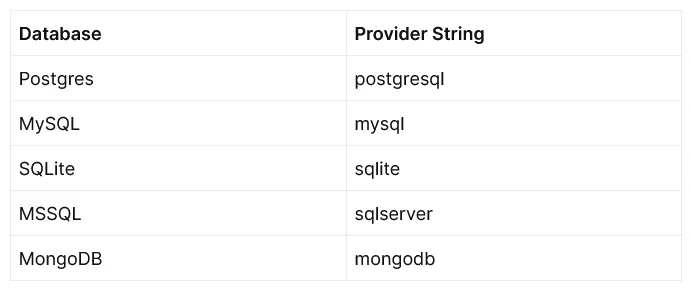
Prisma is an open-source Object-Relational Mapping (ORM) tool that makes complex data interactions easy to handle. Prisma’s ORM approach streamlines database workflows by offering a clear and simple way to interact with the database through its auto-generated query builder. It supports a variety of databases, including PostgreSQL, MySQL, SQL Server, SQLite, and MongoDB, and it can be used for a wide range of development requirements.
Why Use Prisma?
Prisma’s design philosophy centers on three core principles: ease of use, performance, and robustness. Unlike traditional ORMs, which often introduce complexity and performance overhead, Prisma operates at a lower level, offering direct access to the database with minimal abstraction. This design choice not only enhances performance but also ensures that developers maintain control over their database operations, a critical aspect for complex applications.
Benefits of Prisma
- Enhanced Developer Productivity: Prisma’s schema-first approach allows developers to define their application models and relationships in a human-readable Prisma Schema file. Making it easier to manage changes and migrations.
- Strong Type Safety: One of Prisma’s standout features is its support for type safety. Integrated with TypeScript, Prisma ensures that the data your application reads from and writes to the database is type-checked. This integration reduces bugs and errors at compile-time, enhancing the overall reliability of applications.
- Database Compatibility: Prisma’s support for multiple databases and its cross-platform nature make it a flexible option for developers working in diverse environments.
- Simplified Migrations: Prisma Migrate, an integral part of the Prisma suite, automates complex database migrations with ease. It interprets changes to the Prisma schema and translates them into SQL migration files, handling database schema transformations effortlessly.
How Prisma Works?
Prisma fundamentally transforms the way applications interact with databases by introducing an innovative architecture that simplifies data operations. The workflow of Prisma can be broken down into several key stages, starting from schema definition to query execution, which together ensure efficient and optimized database interactions.
#1: Schema Definition and Migration
Everything in Prisma begins with the Prisma schema. This schema is not just a cornerstone for database operations but also acts as a blueprint for your application’s data architecture. In the Prisma schema, you define your database models and the relationships between them using Prisma’s own intuitive schema language. This approach to defining models and relationships is designed to be straightforward and easy to understand, whether you are working with relational databases like PostgreSQL or MySQL, or with non-relational databases like MongoDB.
For instance, here’s a sample Prisma schema model for a relational database using Postgres:
sample Prisma schema model for a non-relational database using MongoDB:
These examples illustrate how to define a simple model Post with various fields in Postgres and MongoDB. You can start with such a schema in a new project or generate a similar schema from an existing database, leveraging Prisma’s flexibility and database-agnostic nature.
#2: Migration and Type Generation
Once the schema is defined, the next step involves migrating this schema to your database. This is done using the prisma migrate command, which automatically generates SQL migration files based on your schema changes. These migrations adjust your database schema to match the models defined in your Prisma schema. Simultaneously, Prisma generates TypeScript or JavaScript types in the node_modules/.prisma/client directory. These types are reflective of your models and their relationships, providing type-safe database access and facilitating development by enabling IDE auto-completion and error-checking.
#3: Query Processing and Optimization
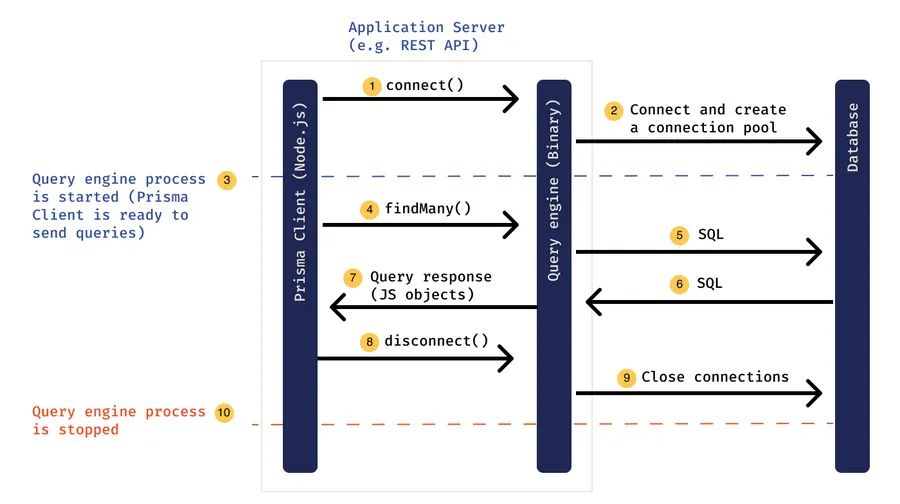
When it comes to querying the database, Prisma employs a powerful Query Engine. This engine acts as an intermediary between your application and the database. Here’s how it works: you write queries using the generated Prisma Client, and these queries are then passed to the Prisma Query Engine. The engine optimizes these queries and converts them into database-specific queries.
One of the significant advantages of this engine is its ability to optimize query performance, notably addressing the notorious N+1 query problem common in applications that use GraphQL. This problem occurs when an initial query is followed by multiple subsequent queries, one for each returned record. Prisma’s Query Engine smartly aggregates and optimizes these queries to fetch all required data in the most efficient way possible.
Seamless Integration and Management
Despite its deep involvement in data handling, the Prisma engine is a component you rarely interact with directly. All communications to the database are managed through this engine, ensuring that your data layer remains robust, efficient, and scalable. This architecture not only simplifies the development process but also enhances performance, making Prisma a powerful tool for modern application development.
Relationships in Prisma
Prisma provides a robust framework to model and manage relationships between data entities in both relational and non-relational databases. These relationships are crucial in representing how data connects across different parts of your application.
Prisma supports several types of relationships: one-to-one, one-to-many, and many-to-many. Each relationship type is defined explicitly in the Prisma schema, allowing for clear, understandable data modeling.
#1: One-to-One Relationships (1–1)
A one-to-one relationship occurs when one record in a table is associated with exactly one record in another table.
Example: Consider a user system where each user has a unique profile.
In this example,
each
Usercan have zero or oneProfile(because the profile field is optional on User),each
Profileis linked to exactly oneUser.
You need to mark the field with the @unique attribute, to guarantee that there is only a single User connected to each Profile.
Multi-field relations in relational Databases only:
#2: One-to-Many Relationships (1–n)
A one-to-many relationship exists when a single record in one table can be associated with multiple records in another table.
Example: A blog where one user can write multiple posts.
In this example, one
Usercan have zero or multiplePosts, but eachPostbelongs to only oneUser.
You need to mark the field with the @unique attribute, to guarantee that there is only a single User connected to each Post.
Multi-field relations in relational Databases only:
Comparing ‘one-to-one’ and ‘one-to-many’ relations:
In relational databases, the main difference between a 1–1 and a 1-n relation is that in a 1–1-relation the foreign key must have a
UNIQUEconstraint defined on it. In non-relational databases, the only difference between a 1–1 and a 1-n is the number of documents referencing another document in the database.
#3.1: Many-to-Many Relationships (m–n) — Relational Databases
Many-to-many relationships allow multiple records in one table to be associated with multiple records in another table.
This type of relationship is often facilitated by a third table known as a “join table” or “junction table.” In relational databases, managing many-to-many relationships involves either explicit or implicit approaches, depending on how much control you need over the relationship and whether additional data is stored in the join table.
Explicit Many-to-Many Relationships:
Explicit many-to-many relationships are used when you need to store additional data on the relationship itself, beyond just the foreign keys. This approach involves manually defining the join table as a model in your schema.
Example: Consider a scenario where authors can write many books, and books can have many authors. You want to also store the role of each author for each book (e.g., writer, editor).
In this example,
BookAuthoris an explicit join table that includesbookId,authorId, and an additional fieldroleto store the role of the author in the creation of the book. The@@idattribute specifies a composite primary key, ensuring uniqueness for each combination ofbookIdandauthorId.
Implicit Many-to-Many Relationships:
Implicit many-to-many relationships are simpler and are used when no additional data needs to be stored in the join table other than the foreign keys. Prisma can abstract the join table, so you don’t have to explicitly define it in your schema.
Example: Suppose you have a scenario where students can enroll in many courses, and courses can have many students.
In this example, Prisma implicitly creates a join table to manage the relationship between
StudentandCourse. The table will only containstudentIdandcourseIdcolumns. Prisma handles the creation and management of this table behind the scenes, and you do not need to define or interact with it directly.
NOTE: Prisma recommend to using implicit m-n-relations if you do not need to store any additional meta-data in the relation table itself.
#3.2: Many-to-Many Relationships (m–n) — Non-Relational Databases
In non-relational databases like MongoDB, many-to-many relationships are typically managed differently due to the lack of a strict schema and the ability to embed documents. However, Prisma’s support for MongoDB and other NoSQL databases may still require explicit definition of relationships, particularly when using Prisma as it aligns more closely with relational database patterns.
Example: Consider a blogging platform where each post can belong to multiple categories, and each category can contain multiple posts.
In this example,
Post Model: Each
Postdocument has a fieldcategoryIDs, which is an array of Object IDs. These IDs refer to theCategorydocuments that the post belongs to. Thecategoriesfield is a virtual relation that uses the IDs fromcategoryIDsto fetch the relatedCategorydocuments.Category Model: Similarly, each
Categorydocument has a fieldpostIDs, which is an array of Object IDs. These IDs point to thePostdocuments that fall under this category. Thepostsfield is a virtual relation that uses the IDs frompostIDsto fetch the relatedPostdocuments.
Creating a Post with Categories:
Fetching Posts with Their Categories:
Adding a New Category to an Existing Post:
Removing a Category from a Post:
Note: Prisma’s support for MongoDB does not typically involve automatic join tables as seen in relational databases, and developers may need to handle relationships through document embedding or manual reference management.
Conclusion
Prisma stands out as an essential tool in the modern developer’s toolkit, especially for those looking to build efficient, maintainable, and robust applications. By leveraging Prisma’s capabilities, developers can ensure that their data models and relationships are well-organized, easily updated, and optimally executed, paving the way for future-proof applications that scale with grace and ease. This exploration into Prisma’s relationship management has hopefully illuminated the path to more effective and streamlined database interactions, empowering you to elevate your projects to the next level.
I appreciate you taking the time to read this article.🙌
Before you move on to explore the next article, don’t forget to give your claps 👏 for this article and share with your friends. Stay connected with me on social media. Thanks for your support and have a great rest of your day! 🎊
✍️ Vinojan Veerapathirathasan.